
App Breakdown #46 · Bop
The UI design of Bop, the pocket DJ app
José isn’t a DJ, and he probably won’t be a daily user. But Bop’s screenshots looked exceptionally fun, and he wants to see its interfaces for himself.

Bop is an app that turns your phone into a DJ booth. José has seen some screenshots of it online, and they look exceptionally fun. He’s not a DJ, and he’s probably not going to be a daily user:
“But if there are cool interfaces to be seen, then I want to see them.” José
He doesn’t have an account, so we get to see the sign-up: very simple, no flair. He signs in with Apple, which he loves for how seamless it is, and the app already has his name when he creates a quick profile:
“Good reminder that when your users log in or sign up with Apple you can just take their name from there, so don't make users type their name if they don't have to.” José
Albums in scuffed, glossy cases
Then the screen fades into the home:
“Okay, I really love what I'm seeing. I don't even know what I'm seeing, but I really love it.” José
Before mixing anything, he takes a look at the album carousel. He loves the outsides of the albums, and he’s not sure whether they’re meant to be a plastic wrap or a scratched-up CD case:
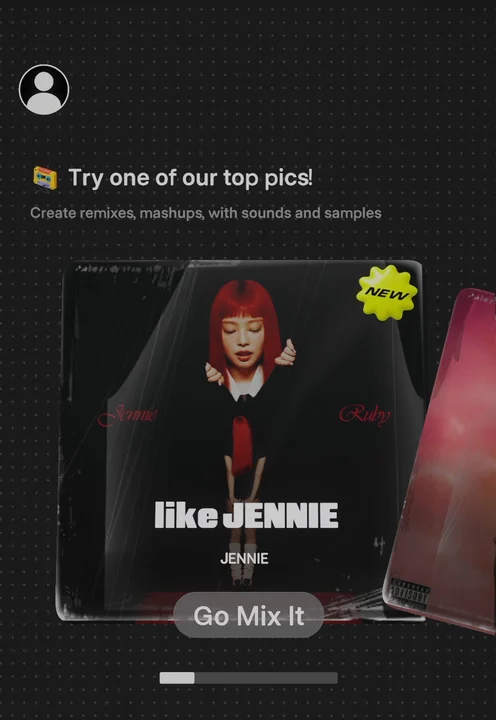
“I love the little bounce as you swipe between the albums, and also there's a haptic as you go through them.” José
Sounds that burst as you scrub
Inside a song, a little tutorial walks you through building your mix: first the beat, then the chords 2:39. Drag the chords around the board 2:50, and as you move between areas, there’s a haptic:
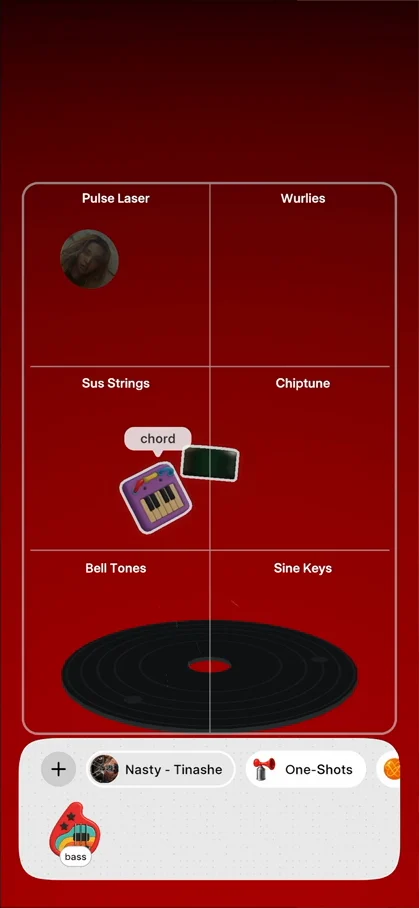
“There's like a kind of explosion on the thing that I'm, that I'm scrubbing, and it changes the icon. This is so cool.” José, 3:00
The tutorial ends by telling you to hit record to save your set when you’re ready 3:10. With the song playing, you see each sound’s animation as it plays 3:17, and he tries to scratch the disc, with a little wiki wiki 3:20.
A disc that spins with the tempo
On the right of the mixer is the BPM. Increase it, and the disc at the bottom spins faster; decrease it, and it slows down.
“I really love these kinds of just relationships between the UI, like you do one thing, it affects the other, and if you're trying to play into the physicality of the real world, then you have to represent that on your UI elements.” José
Above it, a reset sends the BPM counting back up, with a very cool haptic as it goes.
A drawer of sounds
At the bottom there’s a drawer of things: bass, beat and chord. Drag one onto the board:
“Man, I really love this interaction where it basically goes through a string and just changes.” José
The plus adds a track, like a Green Day song, and its bass, chords, beat and voice become things you can drag in:
“Okay, this, this was not immediately intuitive to me in the beginning.” José
To remove something, you bring it back into the drawer, and it gets organized:
“I'm really loving the playfulness of all these icons.” José
Then the app seems to freeze. When he opens it back up, it asks him to accept the community guidelines, and his mix seems to be gone:
“So that's a bummer.” José
A horn that shakes the screen
He starts fresh with a new song, and goes to the One-Shots 8:41. He guesses you can tap the horn at any time 8:45:
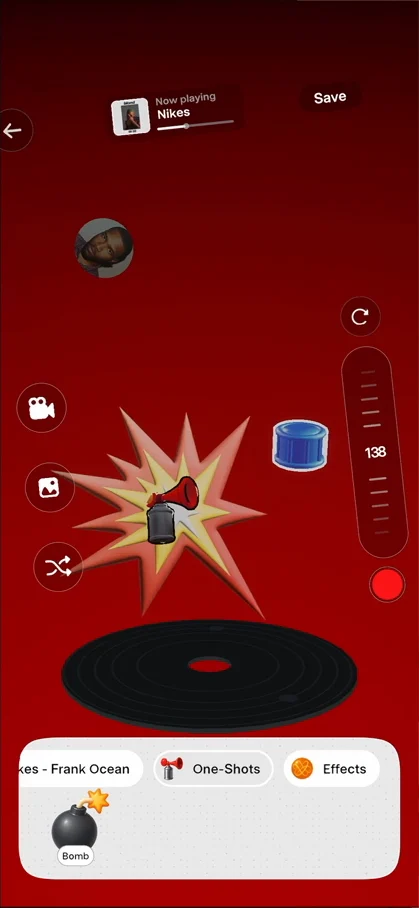
“Oh, notice how the UI shakes when you tap the horn. This is so cool.” José, 8:51
“These kinds of little things where one part of the UI influences everything else in a way that it doesn't need to, but it just represents the physicality of things.” José, 8:56
The bomb does the same thing:
“Okay, it's the same exact effect but a bit longer. Interesting.” José, 9:28
Effects with their own particles
Then the effects 9:34. At first he doesn’t know what the eraser does 9:41. He adds reverb to the drums, and underwater to the song 9:47:
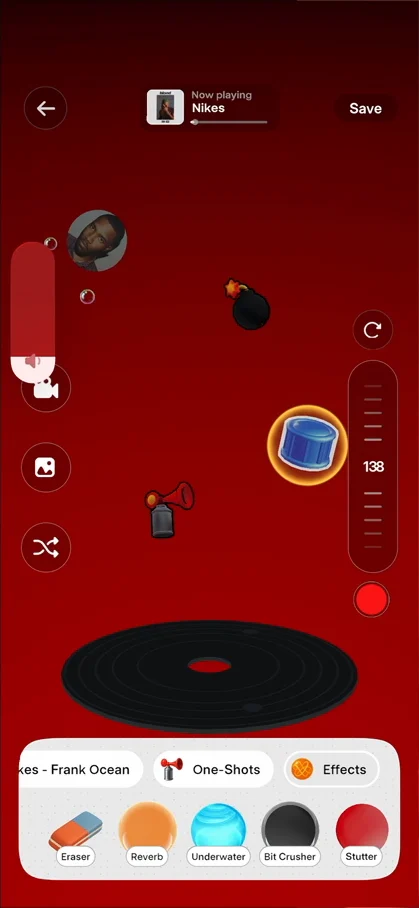
“Look at the little particles, like the little bubbles there.” José, 9:59
And the eraser, it turns out, removes the reverb 10:02. The bit crusher has little particles of its own 10:13, and the stutter has little rays coming in 10:18:
“They have so many like fun animations on this app, but I'm really loving it.” José, 10:22
A button that doesn’t say what it does
A little shuffle button on the left doesn’t appear to do anything 10:29:
“I wish it had some kind of indication of what it does.” José, 10:40
The plus panel has no tricks up its sleeve: it’s very simple 10:51. And when he searches for Dua Lipa:
“Oh, I just wanted to swipe and it actually pressed into the music. So the panel is not great.” José, 10:58
The star of the show
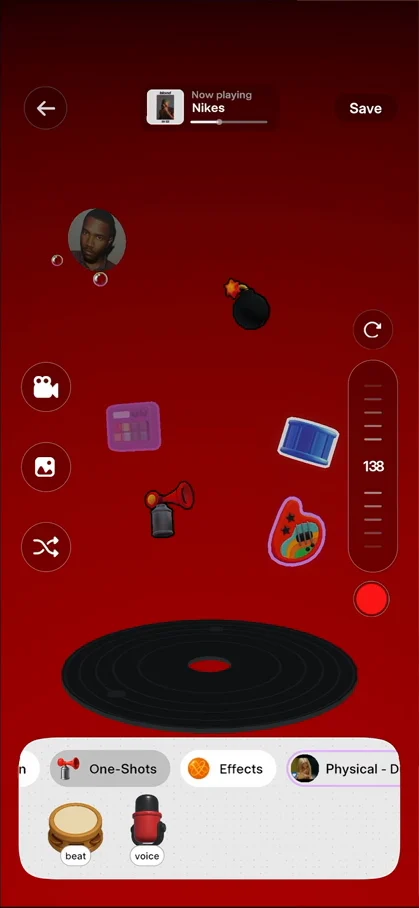
“But I think the star of the show is definitely this bottom drawer here.” José, 11:05
It has lots of cool effects: he loves the little dots on the back, what happens when you drag things onto the board, and the little lines that appear when you switch the position of elements 11:10.
A profile with nothing in it
The last thing to see is the profile, from the top left of the home:
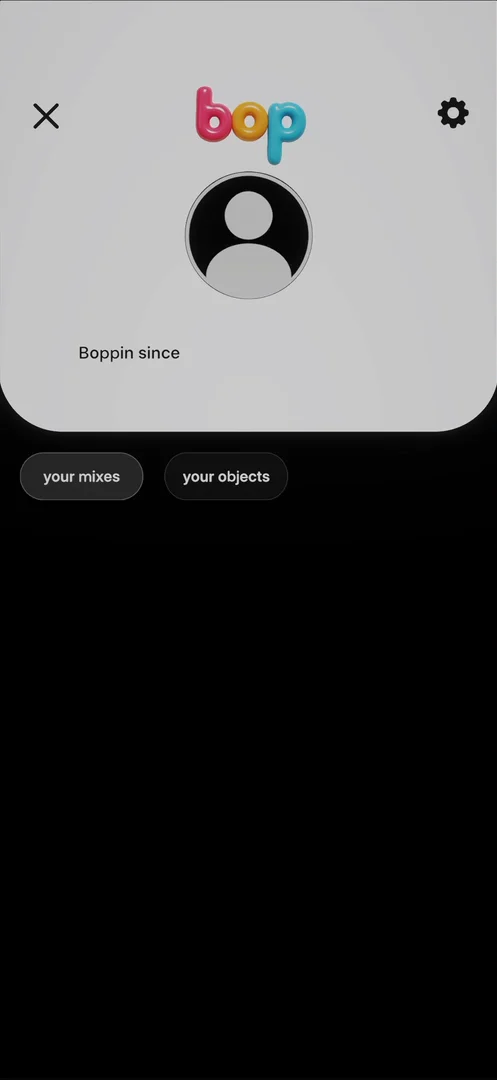
“Okay, this is not a great profile. It just, it looks completely empty.” José
It doesn’t have his mixes, which he guesses is because he didn’t hit save:
“It would be cool to have just recents here, like save by default. Basically hitting save, it's a very 2016 thing.” José, 12:40
“Things just save by default nowadays.” José
In settings, you can only delete your account. Some work to be done on the profile, he says, but that’s fine.
The verdict
He loves the bottom drawer, the little interaction when you’re moving things around, the custom haptics almost everywhere, the little particles that come from the effects, and the style of the album carousel.
“So this is a really fun app.” José
“I'm probably not going to use it if I'm being honest. It's not my type of thing, but in terms of design, there's a lot to learn from here.” José
One design challenge from this episode
Learn design from the apps you love
Practice UI design every day with 300+ briefs from apps like Bop. Finish one and its card is yours.


