
App Breakdown #59 · Widgetable
The UI design of Widgetable, which José thinks makes the best use of widgets
Widgetable is a companion app for long-distance friends and partners, built almost entirely out of widgets. José finds about ten apps’ worth of ideas inside it, and one feature he thinks most people don’t know is even possible on iOS.

José opens the episode on Widgetable, the app that, in his opinion, makes the best use of widgets on the entire App Store 0:00. There are probably ten different successful social apps hiding inside it 0:13:
“So this episode is for the Twitter bros trying to make some MRR.” José, 0:19
He already has an account and a friend added, so he skips the onboarding and focuses on the look of the app, on widgets, and on one secret feature that he thinks most people don’t know is even possible on iOS 0:38.
Cute, dense and always moving
The first thing he notices is that the app looks a lot more like Asian apps than traditional Western ones 0:46:
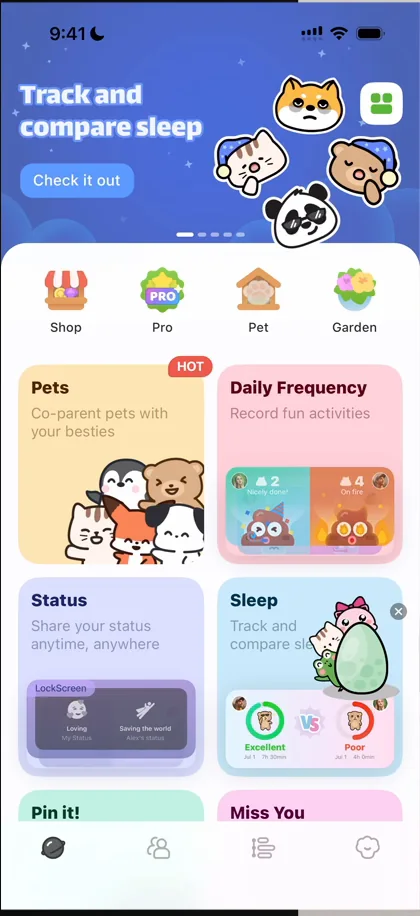
“There’s a lot of information density.” José, 0:58
There’s a widget popping out, lots of things moving, lots of illustration, and in general everything is very cute 1:00.
“This look will generate clicks on TikTok. Copy that.” José
Banners that recruit
One of the banners at the top invites you to become an ambassador 1:51. They’re recruiting ambassadors on TikTok through the app itself 1:54, something he doesn’t think he’s seen another app do so openly 1:59. The banner opens a plain Google Form:
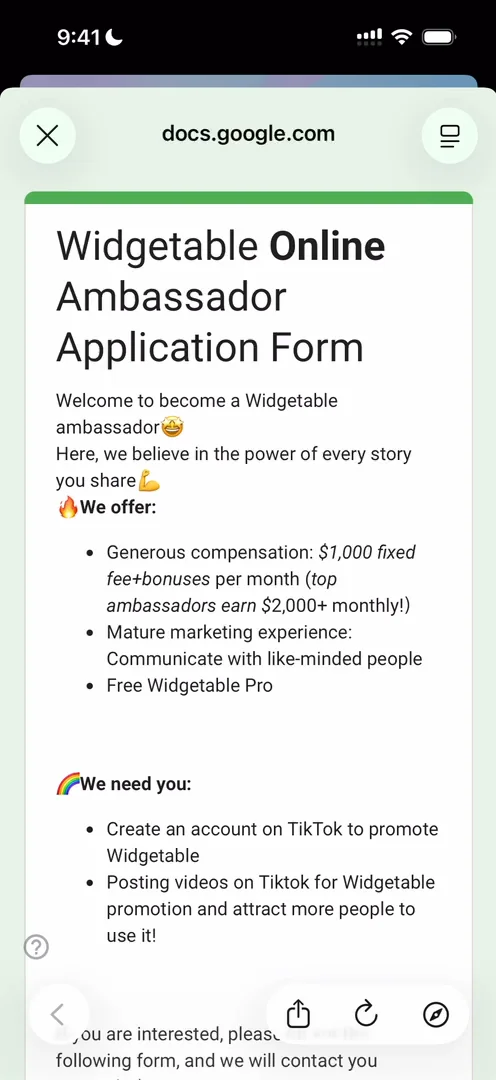
“I really love this. It’s scalable and yet extremely simple, I bet it prints.” José, 2:13
Of the five banners, three promote widgets inside the app and two promote ways for you to make money from it 2:40.
Ten apps in one
Widgetable markets itself as a companion for long-distance friends and partners 2:56. Tracking location, sharing moods, sending notes: all those separate apps live inside this one 3:07, and you can think of each widget as a standalone experience 3:24.
The pets, for example, are a whole universe:
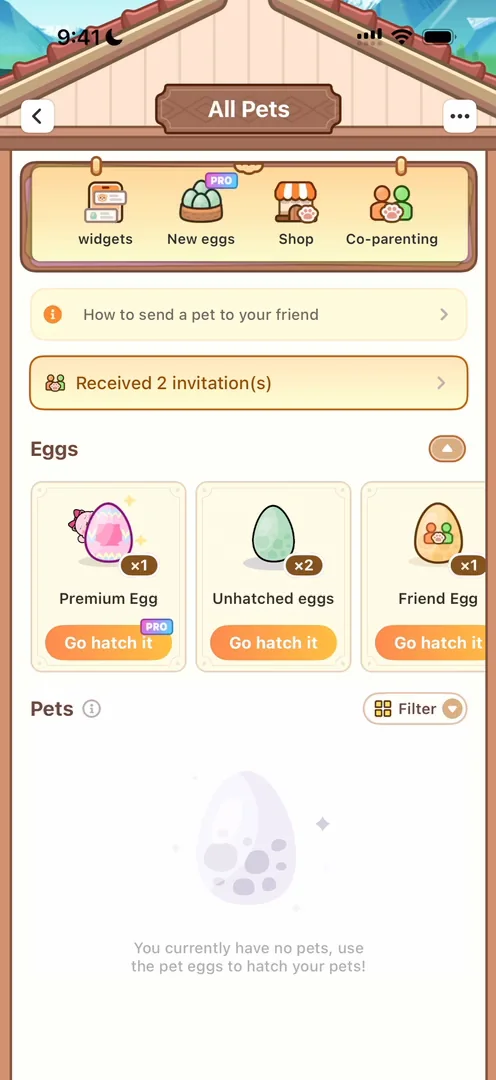
“We have the UI that looks much more like a game than a normal app.” José, 3:53
“So it’s basically an entire universe inside of this just one widget.” José, 4:01
He loves the animation that takes the egg full screen 4:26. To hatch it straight away, he pays: the paywall makes you switch on the free trial yourself, and switching it on loses you an extra gift, which he calls a little dark pattern. When the egg hatches:
“It reminds me of Pokemon where I’m just seeing my first Pokemon now.” José
“This entire app is just so cute.” José, 6:40
The pet you raise is shared with a friend, so it’s a whole social experience, and the pet has a full house to take care of:
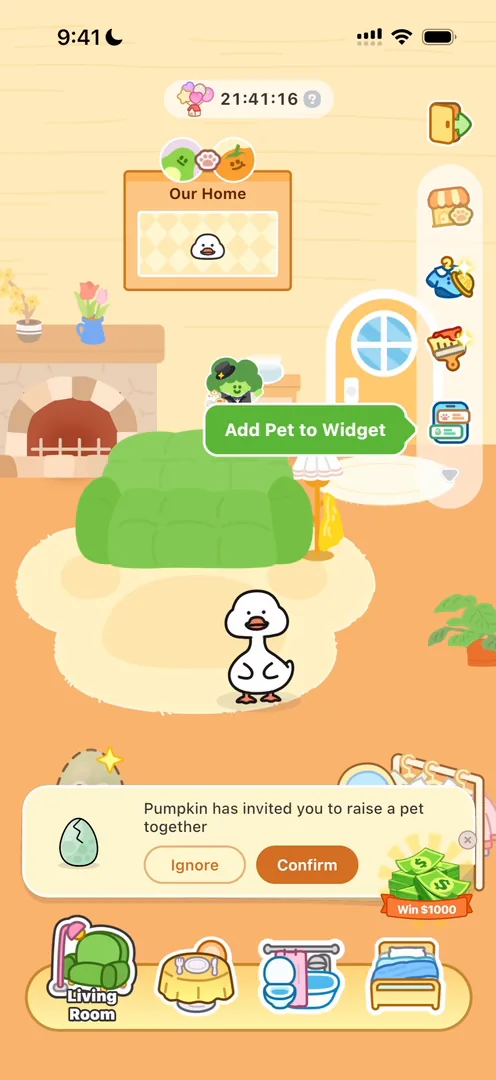
“And now we have a full game inside of this one widget.” José, 7:26
The shop and pet experience reminds him of Finch 8:02, and you can see just how deep each option goes 8:22.
The best widget tutorial he’s seen
Then comes what he wants to focus on, because the entire app is about widgets 8:31. You save the pet as a widget, tap Add, and the app sends you to the Home Screen with a picture-in-picture video that shows you how to add it 8:56:
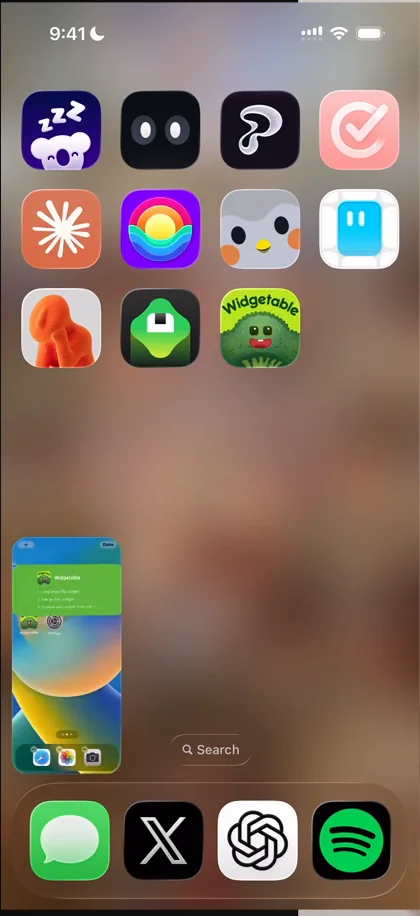
“And I think this is the best video I’ve ever seen of this kind.” José, 9:00
Editable widgets
“Most apps never explore the edit widget feature of iOS because they only have one widget or two widgets.” José, 9:33
Since Widgetable is all about widgets, it makes great use of that feature 9:43: you long-press a widget, tap Edit Widget, and pick from the many games inside the app. The important parts, he says, are the education 10:18, the editability of the widgets 10:22, and how adaptable they are to the entire app 10:28.
Every widget could be its own app
The Daily Frequency widget lets you count things with friends:
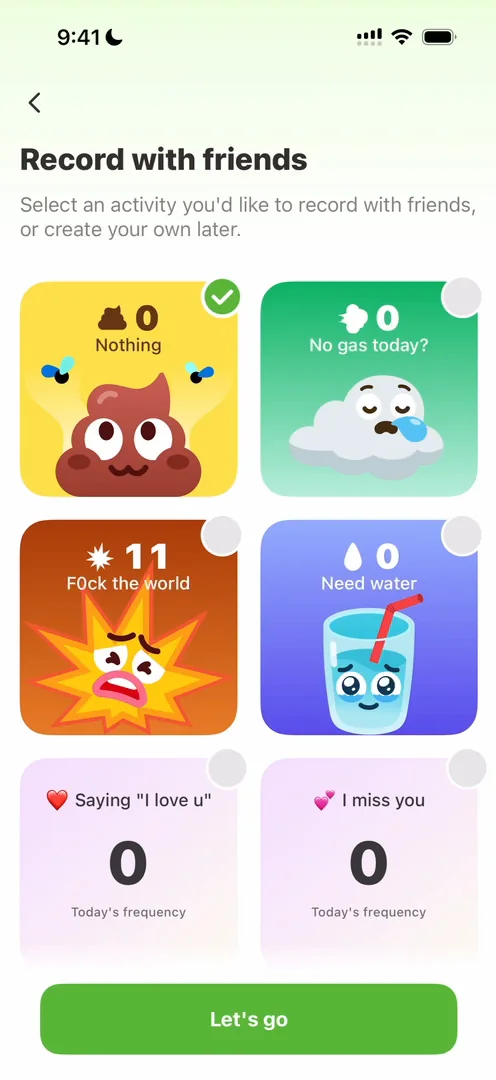
“Like, again, each of these widgets could be their own app and they would make money on TikTok.” José
Once again, he loves that the app guides him through it: the whole UI turns grey, with one pointer, just like in online games.
Locket, inside
The Pin it! widget is basically Locket inside Widgetable 15:16:
“See, I’m not joking when I say that this app is like 10 apps inside of one.” José, 15:11
You can send a friend a photo, an emoji, a drawing or text 15:41:
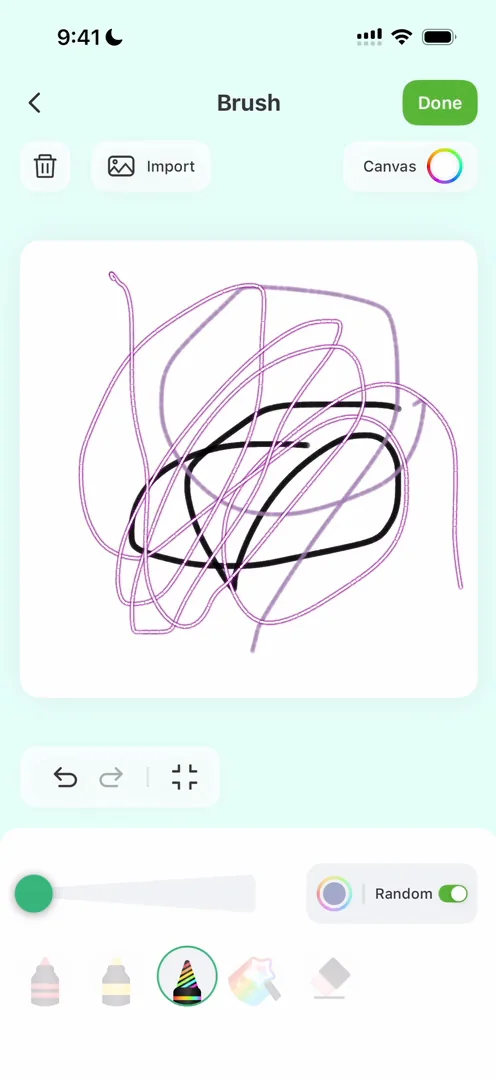
“Look at the amount of tools that they have inside each of these.” José, 15:50
One thing he finds a bit weird: on this screen, it isn’t obvious where you would save the widget 16:32. And there are many more widgets beyond these three:
“If you ever want to do a widget on iOS, download Widgetable please” José, 18:03
Just show them Apple Pay
With this many experiences, he says, the monetisation can be endless:
“This is like Clash Royale on steroids.” José
Inside the app, buying something doesn’t go through a fancy paywall. You tap it, and Apple Pay comes up:
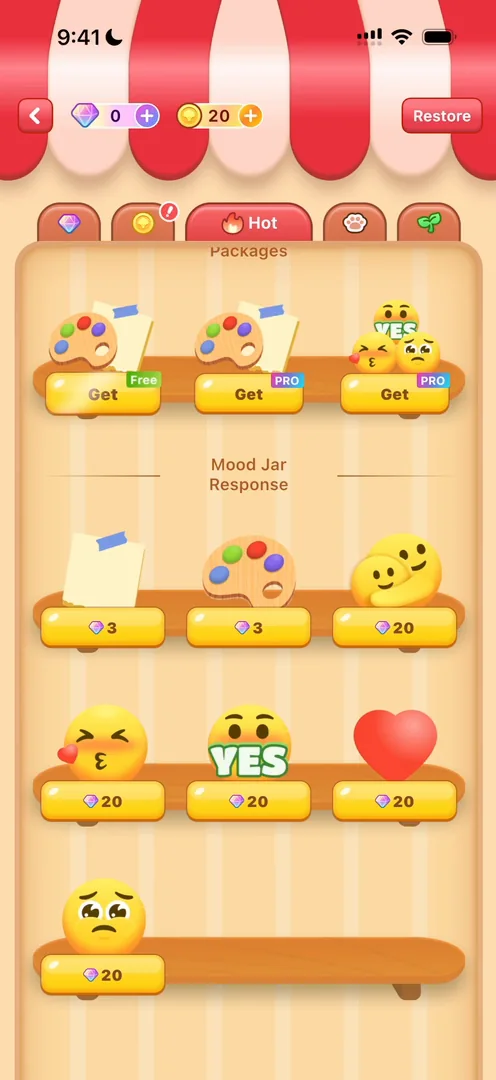
“Just show them the damn Apple Pay. They know how to use it and they trust it.” José
He loves how the colours of the tent at the top change as you tap through the shop’s sections 19:25, and the UI in general:
“It’s extremely cute and each of the little buttons with glows and the illustrations like feel intentional.” José, 19:42
He expected more from the Pro tab, though: it just seems to list what he got by buying Pro 19:55.
Lock Screen widgets
In Garden, you grow a plant on your Home Screen or your Lock Screen 20:54. Widgetable doesn’t just do Home Screen widgets; it also does Lock Screen widgets and more 21:07, and it guides him through the entire process:
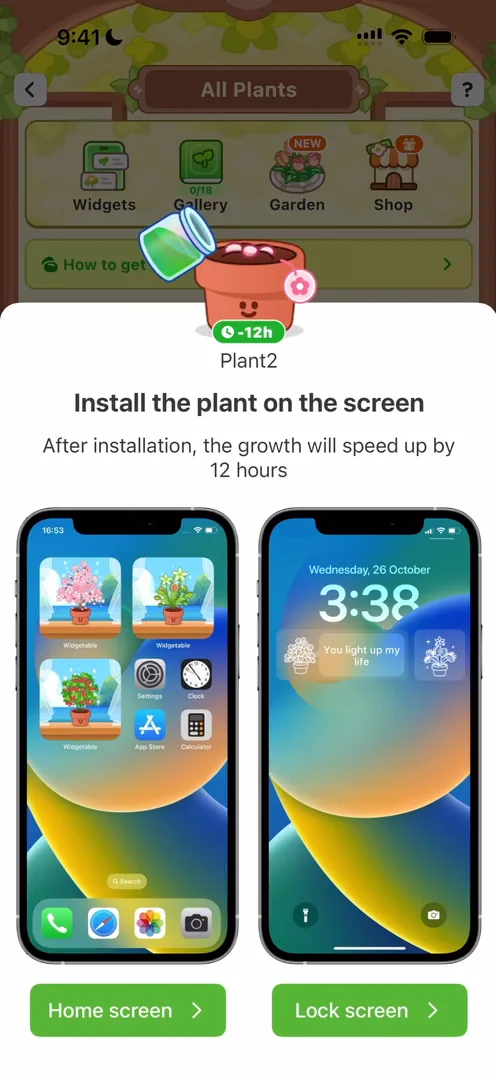
“I have never seen an app guide me through adding a lock screen widget” José
“Now tell me when was the last time that an app actually made you change something on the lock screen.” José
The secret feature: a friend’s wallpaper
Deep in the last tab is the feature he hinted at in the intro 27:46:
“That’s the wallpaper.” José, 27:53
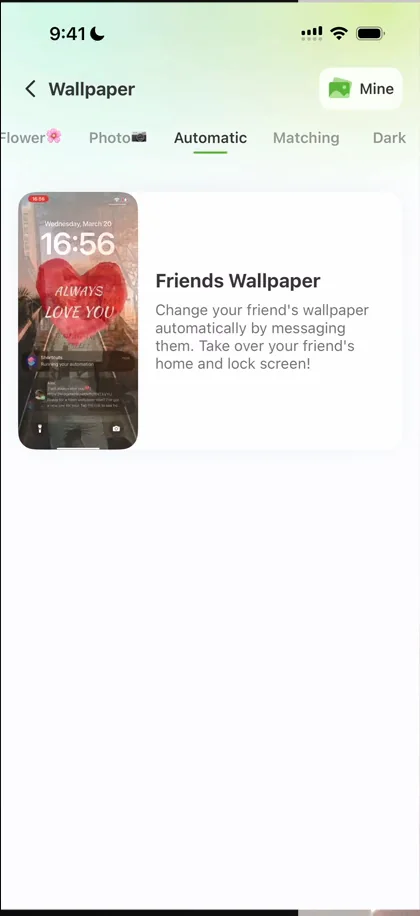
“They are a way for a friend to be able to automatically change your wallpaper” José, 28:14
iOS doesn’t allow that, but they found a workaround with text messages and shortcuts 28:21, and as far as he knows, Widgetable is the only app that does it. He walks through the whole setup on a second phone: a shortcut, an automation, and from then on, a message changes the wallpaper.
“We have seen an app that exploits basically shortcuts, widgets, wallpapers and automations all in one.” José
“To me, it’s wild that this is not a standalone app.” José
The verdict
“They have done so many cool things.” José, 32:32
If there’s one thing they’ve done poorly, he says, it’s keeping things clean 32:35: they’ve added so many features, in so many novel ways, that they kind of jam into each other.
 1 of 3
Three design challenges from this episode
Learn design from the apps you love
Practice UI design every day with 300+ briefs from apps like Widgetable. Finish one and its card is yours.


